MCP security becomes a business priority when an AI assistant moves beyond answering questions and starts accessing company data or taking actions in connected systems.
Imagine an AI agent that checks orders in an ERP platform, retrieves customer information from a CRM and prepares updates without requiring employees to switch between applications. The productivity opportunity is clear. So is the risk: Who determines which data the agent can see, which tools it can use and which changes it can make?
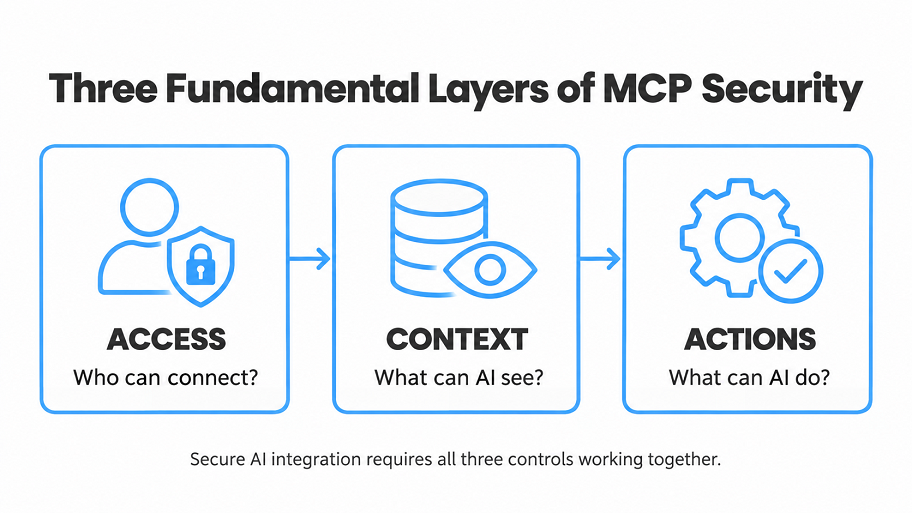
The Model Context Protocol (MCP) provides a standardized way for AI applications to connect to external resources and tools. MCP security encompasses the controls that determine who can connect, which data reaches an agent and what actions it may perform. MCP does not enforce an organization’s security policies automatically. Those policies must be implemented across the host application, MCP servers and the systems behind them.
Why MCP Security Is a Business Decision
An AI assistant connected to a knowledge base can retrieve information. Connected to an ERP system, it might also change a delivery date. Given access to a finance platform, it could initiate a payment workflow.
Each new capability creates business value, but it also increases the impact of an incorrect or unauthorized action. A response containing the wrong information may require a correction. A tool that modifies the wrong customer record may disrupt an operational process.
An MCP architecture typically includes a host application, an MCP client and one or more MCP servers. Servers expose resources and tools that the application can use. The language model may suggest a tool call, but the host application and connected services control and execute the workflow. That gives engineering teams several places to validate a request before an action reaches a business system.
The objective is not to prevent agents from acting. It is to make their behavior predictable, traceable and consistent with existing permissions.
MCP Security: Identity and Access Control
The first question is straightforward: Who is making the request, and what are they allowed to do?
For protected HTTP-based MCP connections, the protocol defines an optional authorization framework based on OAuth 2.1. The MCP client requests access, an authorization server issues an access token, and the MCP server validates that the token was issued for it. This framework can integrate with enterprise identity infrastructure and existing sign-on policies.
The distinction between authentication and authorization matters. A successful sign-in does not grant unrestricted access to company records or operations.
A secure MCP integration should check:
- Identity: Which user or service initiated the request?
- Token validity: Was the token issued for the intended MCP server, by a trusted issuer, and is it still valid?
- Scope: Does the request fall within the permissions granted to the client?
- Business rules: Can this user read this account or modify this order?
- Context: Does the operation comply with the policy for this workflow?
Consider a sales assistant connected to a CRM. A sales representative might be authorized to read accounts assigned to their territory but not export every customer record. The MCP server should enforce the applicable permissions, while the CRM must continue to protect its own data.
OAuth Is a Foundation, Not the Final Control
OAuth helps establish access between components. It does not automatically determine whether a refund is legitimate or whether a specific order may be changed.
Avoid connecting an agent through a powerful shared account simply because it is convenient. Separate read and write permissions, request only necessary scopes and apply least privilege. When an MCP server calls another API, use credentials issued for that API; do not pass the client’s MCP access token through to a downstream service.
The MCP specification also distinguishes HTTP-based connections from local servers using standard input and output (stdio). The OAuth-based authorization specification applies to HTTP transports, while stdio implementations normally obtain credentials from the environment. Neither deployment mode should be assumed secure: local servers also need restricted file-system, process and network access.
Context Isolation: Give the Model Only What It Needs
The second security boundary concerns information. Even a properly authenticated agent can expose sensitive data if its tools return too much context.
Suppose a customer service assistant needs to answer a delivery question. It may require an order number, shipment status and estimated arrival date. It does not need the customer’s payment details, internal profit margin or information about unrelated accounts.
Context isolation should happen before data enters the model, not through a prompt asking the model to ignore fields it should never have received.
In practice, teams can filter records by user and tenant, return only required fields, redact secrets and limit the amount of retrieved content. Access policies should remain active across document repositories, databases and other connected systems.
There is another reason to limit context: retrieved material is not always trustworthy. Documents, emails and tool responses may contain text that looks like an instruction. A malicious document could tell the assistant to send private data to an external address or use a different tool.
This is indirect prompt injection. The safest design treats retrieved content as information to evaluate, not authority to obey. Model instructions cannot replace application-level validation, isolation and authorization.
Safe Tool Execution: Control Actions Before They Run
An AI agent’s ability to read data is different from its ability to change it. That distinction should shape the design of every MCP tool.
For example, checking inventory may be a low-risk operation. Adjusting inventory quantities could affect purchasing, production or customer delivery commitments. Approving a payment carries still greater consequences.
A secure execution flow should validate the selected tool, input parameters, target resource and user’s authority before performing a sensitive action. The model may propose a change, but it must not be the component that approves its own request.
High-impact operations may require human approval. The confirmation needs to be useful: show the record, current value, proposed change and likely consequence. Asking users to approve every routine lookup creates fatigue, so approval rules should reflect risk rather than interrupt every interaction.
For production systems, it also helps to separate tools by function. A get_order tool can have read-only access, while an update_order tool requires an additional permission and possibly approval. This makes permissions easier to reason about and reduces the chance that one broad tool becomes an unintended administrative interface.
Finally, record the outcome. An audit trail should connect the original user request with the tool call, policy decision, approval and result, without exposing tokens or unnecessary sensitive data.
Five MCP Security Risks Worth Testing
MCP security is not limited to protecting a network connection. Teams also need to evaluate the tools, content and dependencies an agent can encounter.
- Tool poisoning and prompt injection. A tool description, parameter schema or retrieved document may contain instructions that redirect the model. Review tool metadata and schemas, validate inputs and outputs, and keep authorization outside the model’s discretion.
- Untrusted servers and supply chain changes. An unreviewed MCP server can introduce risky dependencies or gain access to files and APIs. Maintain an approved server catalog and monitor changes. A rug pull occurs when a tool’s description or behavior changes after it has been trusted.
- Excessive permissions and token misuse. Broad credentials increase the damage an agent or attacker can cause. Validate token audience and scope, protect tokens in storage and never assume a successful login authorizes every downstream action.
- Local and remote server exposure. A local HTTP server may be reachable by other processes or exposed to unsafe browser interactions. A local stdio server can also inherit excessive file-system or process privileges. Sandbox local servers, restrict their permissions and apply appropriate transport security, network controls, rate limits and DNS-rebinding protections where relevant.
- Missing monitoring and accountability. A final chatbot response does not explain why a record changed. Track tool calls, authorization failures, unusual activity and changes to the approved tool catalog. Logs should support incident investigation without becoming another source of sensitive data leakage.
These risks reinforce an important principle: trust should be evaluated at each meaningful request, not granted indefinitely because an agent connected successfully once.
Example: An AI Agent Connected to an ERP System
Consider an operations manager asking an assistant:
“Find the delayed orders for Customer A and move the delivery date for the order we discussed to next Friday.”
A well-designed workflow does not immediately execute an update. Instead, it follows clear steps:
- Verify identity. The system confirms the manager’s identity and checks whether they can access Customer A’s orders.
- Retrieve limited context. The ERP integration returns the relevant order records and fields needed to identify the correct order — not the customer’s full financial history.
- Interpret and clarify the request. The agent identifies the possible order and proposed date. If either is ambiguous, it asks the manager to clarify rather than guessing. Notes attached to the order may provide context but cannot override the workflow’s instructions or permissions.
- Validate the action. The application checks whether the manager can update this type of order and whether the proposed date complies with business rules.
- Confirm and execute. Where approval is required, the manager sees the exact order, current date and proposed replacement. Only then does the system call the update tool.
- Log the result. The system records the decision and outcome. If the request violates a rule, the assistant explains the restriction instead of attempting another path around it.
This approach does more than reduce security risk. It makes automation auditable and operationally reliable. The business decides which steps can run automatically, which need approval and which remain outside the agent’s authority.
MCP Security Checklist for Production Teams
Before deploying an agent with access to business systems, review these questions:
- Approved tools: Do we know which MCP servers and capabilities are connected and who owns them?
- Identity and permissions: Are tokens validated for their intended audience, and are user-level business permissions enforced?
- Data boundaries: Can an agent retrieve only the fields and records required for its task, including across tenants?
- Action boundaries: Are read and write operations separated, with additional checks for high-impact changes?
- Untrusted input: Have we tested malicious tool descriptions, documents and attempts to redirect tool use?
- Credential protection: Are tokens kept out of prompts, URLs and logs, with secure storage and rotation policies?
- Visibility: Can we trace a tool call to the user, authorization decision and resulting business action?
- Failure behavior: Does the system stop safely when a token expires, approval is missing or a downstream service fails?
A checklist is not a substitute for testing. It establishes the minimum questions an engineering team should be able to answer before production access is granted.
How to Deliver MCP Security Without Slowing AI Adoption
Security does not need to turn an AI pilot into a major infrastructure project. Start with one workflow, a small number of approved tools and a measurable result.
Map the process first: what should the agent read, what can it propose and what may it change? Run an initial pilot with read-only access or simulated writes. Then introduce controlled actions after the team has validated permissions, failure handling and auditability.
Test the boundaries, not only the successful user journey. Can the agent refuse another customer’s data? Does it reject an unauthorized update? What happens when a tool’s behavior changes or a document contains hostile instructions?
Measure operational value alongside security: time saved, successful tasks, manual corrections, approval frequency and blocked actions. These indicators help determine whether the design is both useful and safe to scale.
MCP can accelerate AI integration. Secure execution is what makes that integration viable inside real business processes.
MCP Security: Frequently Asked Questions
What is MCP security?
MCP security is the combination of identity checks, authorization, context isolation, tool validation, execution controls and auditing used to protect AI applications connected through the Model Context Protocol.
Is MCP secure by default?
No. MCP standardizes communication between applications and tools and defines optional authorization mechanisms for HTTP-based transports. Secure deployments still need properly configured identities, least-privilege access, business-rule enforcement, safe handling of untrusted content and monitoring.
How do you secure MCP servers in production?
Use approved servers and least-privilege credentials, validate token audience and user permissions, restrict the context returned by tools, sandbox local servers, review tool schemas, require risk-based approval for sensitive changes, and log execution outcomes without exposing secrets.
Next Steps & Further Reading
If your organization is considering AI agents connected to a CRM, ERP or internal knowledge base, start with a focused pilot and clear rules for data access and actions. Define what the agent can do independently, what requires approval and how your team will measure success.
At Stermedia, we help organizations design and build AI solutions around real business workflows — from integration architecture and access controls to implementation, testing and production deployment.
Want to discuss your project? Contact our AI team.
Continue Reading:
- Conversational AI in Software Development Explained — how AI assistants use context and connect with digital products.
- Forward Deployed Engineering: Why Enterprise AI Needs More Than a Model — why enterprise AI requires integration, ownership and operational design.
- AI Readiness Assessment: Process Before Model Choice — how to assess workflows, data and governance before implementation.
For the technical authorization requirements, see the official MCP authorization specification.
For additional security guidance, consult the official MCP Security Best Practices and the OWASP MCP Security Cheat Sheet.